An AI agent can end a task in four ways. Only one of them is dangerous
An AI agent can end a task in three good ways and one dangerous one: it decides it's "good enough" when nobody defined good. Defining good is design work.

Omer Frank

The agent writes: "Done. I added a disabled state to every button in the design system." You open it, take a quick look, and everything seems fine.
A week later, a developer on your team asks why the secondary button looks the same whether it's enabled or disabled, and where that gray came from, since it isn't in the tokens at all.
The agent didn't lie to you. It really thought it was done. It just finished the fourth way.
An AI agent can end a task in four ways. Three of them are good, even when they don't look it. The fourth looks exactly like success, and that's what makes it dangerous. It's also the one designers are better placed to prevent than anyone. To see why, you first need to see how an agent works.
An agent works in a loop
Most designers I meet started working with AI the same way: you write a request, get an answer, fix it, ask again. "Make the button bigger." "No, a bit less." "Now the color clashes with the rest of the screen." You look at the result, compare it to what you wanted, and decide what the next fix is. With a prompt, you are the loop.
An agent works differently. You give it a task with a finish line, and it runs those rounds on its own. That's called the agentic loop. Anthropic describes the loop in Claude Code as three phases that repeat: gather context, take action, and verify the result.
In studio language, it looks like this:
Understand. Before touching anything, read the brief, look at what already exists and find the materials: the tokens, the components and the rules.
Make. Change one thing.
Check. Look at the result and compare it to the brief, not to your gut.
Decide. Done? Stop and hand it over. Not done? Back to the start, with what you learned this round.
Anyone who has designed a screen knows this. It's how we work between one version and the next. But look at the last step: the decision to stop now moves from you to the agent. And that's where the four ways come in.
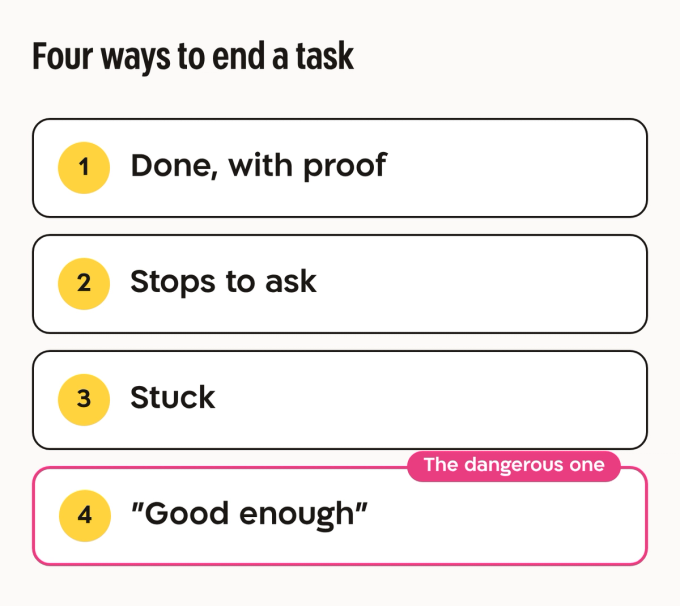
The four ways an agent ends a task
Every loop ends sometime. The question is how.
1. Done, with proof. The agent reached the finish line and can show it. Not "I think it looks good", but "I opened every variant, and here's what I checked."
2. Stops to ask. The agent hit a boundary you set in advance. Say it thinks a new color token is needed, but it's only allowed to propose one, not add it. So it stops and waits for your call.
3. Stuck. It tries the same thing again and again, or starts fixing things nobody asked for. Frustrating, but at least it's out in the open: you see right away that something didn't work, and you can learn what was missing.
4. "Good enough." The agent stops because it decided the work is good enough, without anyone having defined what "good" means.
And here's the twist: the third way, which looks like failure, is actually safe, because you see it right away. The fourth looks exactly like the first. Same message, "Done", same sense of relief. Except there's no check behind it.
Why is "good enough" the dangerous one?
Because you don't know it happened. A stuck agent wastes ten minutes of your time. An agent that stopped at "good enough" slips a mistake into the work that surfaces a week later, with someone else, after screens have already been built on top of it.
Designers know this from the other side of the table. It's what happens to a junior designer who gets a brief with no finish line. They keep polishing, or stop halfway, and have no way of knowing which is right. They're not lazy or untalented. Nobody told them what "done" looks like.
The fourth way is easiest to spot with the question every design critique asks: "What did you check?" An agent that's really done answers with a list: which variants it opened, what it compared them against, what passed and what didn't. An agent that stopped at "good enough" answers with a feeling: "looks good", "it's all consistent", "came out clean".
The agent won't be better than the finish line you gave it.
And this is where designers have a real edge. Defining what "good" means in design, in a way that can be checked, is exactly what you do every day: in the brief, in design QA and in every comment about spacing.
The same task, with a finish line
Back to the button. This time, instead of "add a disabled state to the buttons", you give the agent a finish line: every button variant has a disabled state, only existing tokens are used, and no other component changes.
First it understands: where the buttons are defined, which tokens exist, and how other states like hover are built. Then it makes: it adds the state. Then it checks: it opens the button page and sees for itself that on the secondary button, the new state barely differs from the default. It goes back, picks a different token from the system and checks again. This time every variant passes and nothing else moved. It stops and tells you what it did and how it checked.
It ran into exactly the same problem as last time. The difference is that this time it caught it itself, because it had something to check against.
And what were you doing meanwhile? You wrote the finish line. With a prompt, you do the iterations. With an agent, you design them.
The problem usually isn't the model
Everything around the loop is called the harness. The simplest way to think of it is as the studio the agent works in: the brief with the finish line, the map that tells it what to read first, the design system it takes its materials from, and the boundaries that set what it may do on its own and what waits for you.
The same talented designer will produce completely different work in a studio with a clear brief and a tidy design system than in one where everyone guesses. The model is the talent. The harness is the studio.
So when an agent closes a task at "good enough", the most useful question is: is the problem the model or the studio? In most cases I see, it's the studio. The agent didn't know where the tokens were, nobody told it what not to touch, or the finish line was "make it nice".
That's why, when an agent gets something wrong, you fix the agent and not just the output. Fix only the output and you'll get the same mistake tomorrow. Fix the studio and every loop after it gets better.
In a team of agents, "good enough" rolls downstream
A team of agents is really several loops passing work to each other, like a product team: research goes to design, design goes to review, and review sends the work back to whoever needs to fix it.
This is where the fourth way gets expensive. When one loop finishes at "good enough", the next loop takes it as raw material and builds on it: a wrong token lands in twenty screens before anyone notices. That's why every loop in a team has its own finish line and a clear handoff point: who it gets work from, and who it passes it to when it's done.
One participant in my workshop went back to the office and built a QA agent: a single loop whose whole job is to check every new feature against the design standards they defined themselves: spacing, polish and all the small details. In effect, an agent that catches "good enough" before it reaches users. Forty minutes of work, and today it's part of every release.
How do you prevent the fourth way?
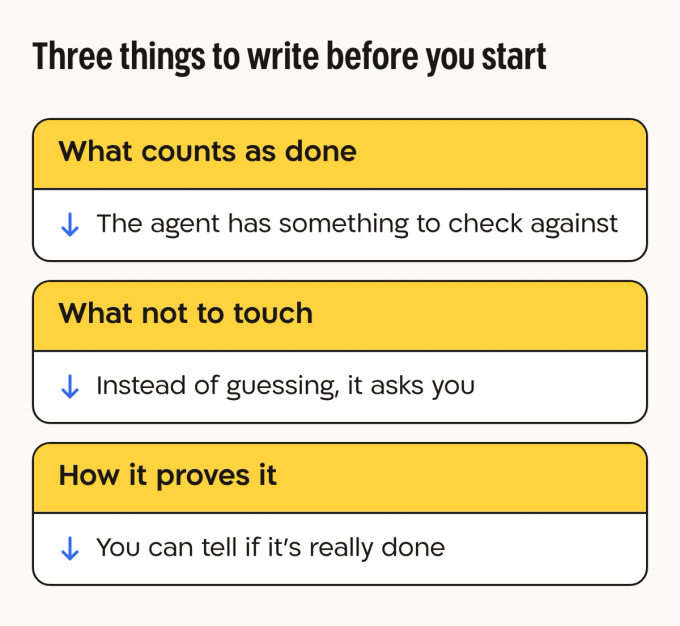
Start with one real task. Pick something small from your own work, something that usually takes a few rounds of fixes. Before you open Claude, write down three things. Each one keeps the agent away from the fourth way:
What counts as done. One sentence you can check. Not "a nice button", but "every variant has a disabled state, and no new token was added." That gives the agent something to check against, not just a feeling.
What not to touch. What the agent doesn't change without asking you first. That way, instead of guessing, it stops to ask.
How it proves it. What it needs to show you when it says it's finished. That way you can tell a real finish from one that only looks like it.
Now give it the task and the three things. When it stops, ask yourself which of the four ways it ended. If it got stuck or stopped at "good enough", don't fix the result. Fix one of the three things and run it again.
You don't need to write code or think about files. You talk to Claude in plain language, and you think about what designers have always thought about: what the role is, what the brief is, and how you know it's done.
A prompt gives you an answer.
An agent gives you a loop.
And your job is to decide how it ends.
Want to learn to design the loop?
This post looked at one loop, the ways it ends and the studio around it. In my Studio Method workshop, you do it hands-on: you build a small team of agents that works like a studio, with a brief, a map and clear boundaries.
The workshop is two live sessions on Zoom, three hours each, in the same week. In the first, you take an agent apart and set up its studio. In the second, you build agents and connect them into a team that passes the work from hand to hand. You practice on a design system, and you won't write a single line of code.
Groups are small, up to 12 people, so you leave with a team of agents of your own that already works. The workshop is taught in Hebrew, and the upcoming dates are on the workshop page.
Frequently asked questions
What are the ways an AI agent can end a task?
Four. Done, when it can prove it reached the finish line. Stops to ask, when it hits a boundary that needs your approval. Stuck, when it repeats the same attempt without progress. And "good enough", when it decides on its own that the work is good enough, without anyone having defined good. Only the fourth is dangerous, because it looks like success.
How do you know an agent is really done?
Ask it what it checked. An agent that's really done will show what it compared against, what passed and what didn't. If the answer is a feeling, like "looks good", it probably stopped at "good enough".
What is an agentic loop?
The way an AI agent moves toward a goal: it gathers information, takes a step, checks the result, and based on what came out decides whether to keep going or stop. It repeats that round until it finishes, stops to ask, or gets stuck.
What is the difference between a prompt and an agent?
A prompt is one request and one answer, and you do the checking and the next fix yourself. An agent gets a task with a finish line and runs the rounds on its own: it changes, checks and corrects itself until the task is done.
What is a harness?
Everything around the agent's loop: the brief, what it reads before it starts, the materials it works with (a design system, for example) and the boundaries of what it may do on its own. The same model works much better inside a well-set-up harness.
Do designers need to know how to code to work with agents?
No. In Claude Code you talk to the agent in plain language, and Claude writes the files. What designers need is exactly what they already know how to do: write a brief, define what counts as done, and check work against a standard.
Sources
Anthropic, How Claude Code works
Omer Frank
I started in visual design, moved on to product design and innovation, and for 17 years I have helped people and organizations work out what is worth building and how to design it well. Today I build with Claude Code and teach how to do discovery and design with it.